

TL;DR: Building an author website starts with choosing the right platform, securing your domain name, and adding the pages every reader expects; a homepage, book pages, an about page, and an email signup. This guide walks you through every step, from blank screen to published site, using WordPress.
Your author website is the only piece of the internet you actually own and most indie authors either don’t have one or built theirs in a panic the week before launch.
I build author websites. That’s what I do every day. And I keep seeing the same patterns, authors who spent months polishing their manuscript will throw up a website in an afternoon and wonder why nobody’s finding them online. Here’s the thing your website isn’t a nice-to-have. It’s the foundation of your entire author platform. Social media accounts can get suspended. Algorithms change overnight. Amazon could tweak their author page layout tomorrow and you’d have zero say in it.
Your website? That’s yours. Nobody can take it away, throttle your reach, or change the rules on you.
This guide is everything I’ve learned from building author websites across every genre — romance, thriller, fantasy, nonfiction, you name it. Whether you’re publishing your first book or your fifteenth, this is the complete roadmap to building a site that looks professional, captures readers, and actually helps you sell books.
Let’s build this thing.
🤔 Do You Actually Need an Author Website?
Short answer — YES!!!
I hear the pushback all the time: “But I have an Amazon author page!” or “My Facebook group is where all my readers are!”
Those are great. Keep them. But here’s the difference — you’re renting space on those platforms. Facebook decides how many of your followers see your posts (on average, organic reach is around 5-6% of your followers). Amazon decides how your books get displayed. Twitter… sorry, X could restructure next Tuesday.
Your website is the one place online where:
- You control the design — it matches YOUR brand and YOUR genre
- You own the traffic — no algorithm deciding who sees what
- You capture emails — the single most valuable asset for any author
- You look professional — readers, agents, and publishers all check for a website
If you’re on the fence, I wrote an entire breakdown on this: Do You Need an Author Website? — but the short version is: if you’re serious about building a career as an author, the answer is always yes.
💻 Choosing Your Platform: WordPress vs. The Rest
This is where most authors get stuck before they even start. There are a LOT of website builders out there, and they all claim to be the easiest. Let me cut through the noise.
Here’s an honest comparison:
| Platform | Best For | Ownership | Flexibility | Cost |
|---|---|---|---|---|
| WordPress.org | Authors who want full control and growth | ✅ You own everything | ⭐⭐⭐⭐⭐ | Hosting + domain (~$5-15/mo) |
| Squarespace | Authors who want beautiful and simple | ❌ You’re renting | ⭐⭐⭐ | $16-49/mo |
| Wix | Authors who want drag-and-drop easy | ❌ You’re renting | ⭐⭐⭐ | $17-36/mo |
| Carrd | Single-page “link in bio” sites | ❌ You’re renting | ⭐ | Free-$49/yr |
My recommendation? WordPress. And I’m not just saying that because it’s what I use — I’m saying it because WordPress powers over 43% of all websites on the internet, and there’s a reason for that. It’s the most flexible, it grows with you, and this part matters — you actually own your site. If you ever want to move to a different host, you take everything with you. Try doing that with Squarespace.
That said — let me be straight with you. WordPress has a learning curve. It’s not as “plug and play” as Squarespace or Wix. If you truly want zero tech involvement and you’re fine paying more for less control, Squarespace will get you a beautiful site fast.
But if you want a site that can grow with your career — one that can handle a blog, an email list, a bookstore, a podcast, event pages, and whatever comes next — WordPress is the platform that won’t hold you back.
Important: I’m talking about WordPress.org (self-hosted), NOT WordPress.com (the limited hosted version). They sound the same but they’re very different. WordPress.org gives you full control. WordPress.com has restrictions similar to Squarespace.
📄 The 7 Essential Pages Every Author Website Needs
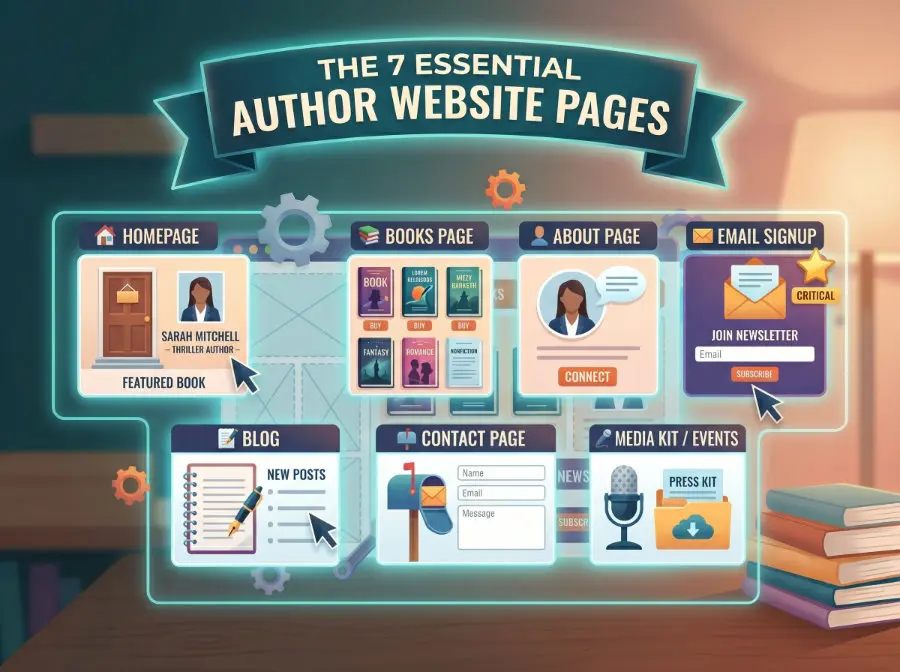
Every author website needs these seven pages. Miss one and you’re leaving readers — and opportunities — on the table.
I covered this in detail in What Should Be on an Author Website (Most Authors Miss #4), but here’s the quick checklist:
✅ The Essential Seven
- 🏠 Homepage — Your digital front door. Professional headshot or hero image, a clear statement of what you write, and your latest/featured book prominently displayed. A reader should know your genre within 3 seconds.
- 📚 Books Page — High-res covers, compelling descriptions (short AND long), reviews/blurbs, and clear “Buy” buttons for every retailer. If you write series — reading order. This is non-negotiable.
- 👤 About Page — Not your resume. A relatable story that helps readers connect with the human behind the books. Include your author photo. Tell them why you write what you write.
- 📧 Email Signup — This is the one most authors miss, and it’s arguably the most important page on your entire site. More on this in Section 7.
- 📝 Blog — Fresh content keeps your site alive in Google’s eyes and gives readers a reason to come back. You don’t need to blog daily — even monthly is fine if it’s good.
- 📬 Contact Page — A simple form for readers, agents, event organizers, and media to reach you. Not your personal email address displayed publicly — a contact form.
- 🎤 Media Kit / Events — If you do speaking, signings, or podcast appearances, this page makes it easy for organizers to book you. Include a downloadable press kit with your bio, headshot, and book covers.
🔨 Step-by-Step: Building Your Author Website on WordPress
Alright, here’s where we actually build the thing. I’m going to walk you through this the same way I walk my clients through it.
Step 1: Secure Your Domain Name
Your domain is your address on the internet. For authors, the play is simple — use your author name.
www.YourAuthorName.comis the gold standard- If your name is taken, try
www.AuthorYourName.comorwww.YourNameWrites.com - Avoid numbers, hyphens, and anything hard to spell over the phone
- Register through a reputable registrar like Namecheap, Google Domains, or Cloudflare
Cost: about $10-15/year. That’s it.
Step 2: Choose Your Hosting
Your host is where your website files live. Think of the domain as your address and hosting as the actual house.
Here’s what matters when choosing a host:
- Speed — slow sites lose readers (and Google punishes them)
- Uptime — your site needs to be available 24/7
- Support — when something breaks at 2 AM before your book launch, you need help
- WordPress-optimized — not all hosting is created equal for WordPress
Popular options include SiteGround, Cloudways, and managed WordPress hosts. We also offer author-specific hosting that’s optimized for exactly this use case — WordPress sites with book pages, email capture, and the plugins authors actually need.
Step 3: Install WordPress
Most modern hosts offer one-click WordPress installation. Literally — you click a button, fill in your site name and admin credentials, and WordPress is installed. It takes about 2 minutes.
Once installed, you’ll see the WordPress dashboard. It looks overwhelming at first. That’s normal. You’ll spend most of your time in just four areas:
- Pages — where you create your essential pages
- Posts — where your blog lives
- Appearance — where you choose and customize your theme
- Plugins — where you add functionality
Step 4: Choose a Theme
Your theme controls how your site looks. For authors, you want something that:
- Is mobile-responsive (over 60% of web traffic is mobile)
- Loads fast (no bloated mega-themes)
- Has clean typography — readers are readers, they care about text
- Matches your genre — a romance author’s site should feel very different from a thriller author’s site
My recommendation: Kadence Theme + Kadence Blocks. Both are completely free — no license required. Kadence gives you a fast, modern theme with a built-in block editor that lets you customize layouts without touching code. It’s what we use for our author website templates, and it handles everything from book pages to email signup forms to blog layouts. Other solid free options include Astra and GeneratePress, but Kadence is the one I keep coming back to for author sites.
Step 5: Install Essential Plugins
Plugins add functionality to WordPress. Here are the non-negotiables for an author website:
| Plugin | What It Does | Cost |
|---|---|---|
| SmartCrawl | Helps Google find and understand your site (SEO meta, sitemaps, schema) | Free |
| Kadence Blocks | Page builder with a built-in form feature — powers your Contact page too | Free |
| Mail Mint | Email marketing, subscriber capture, and automation | Free tier |
| Hummingbird | Caching and performance optimization — makes your site load faster | Free |
| Smush | Compresses images without losing quality | Free |
For a full walkthrough of free tools, check out 7 Free WordPress Tools Every Author Needs — it covers the full stack.
Warning: Don’t go plugin-crazy. Every plugin you add slows your site down slightly and adds a potential security risk. Install what you need, skip the rest. Five to eight plugins is the sweet spot for most author sites.
🎨 Designing Your Author Website
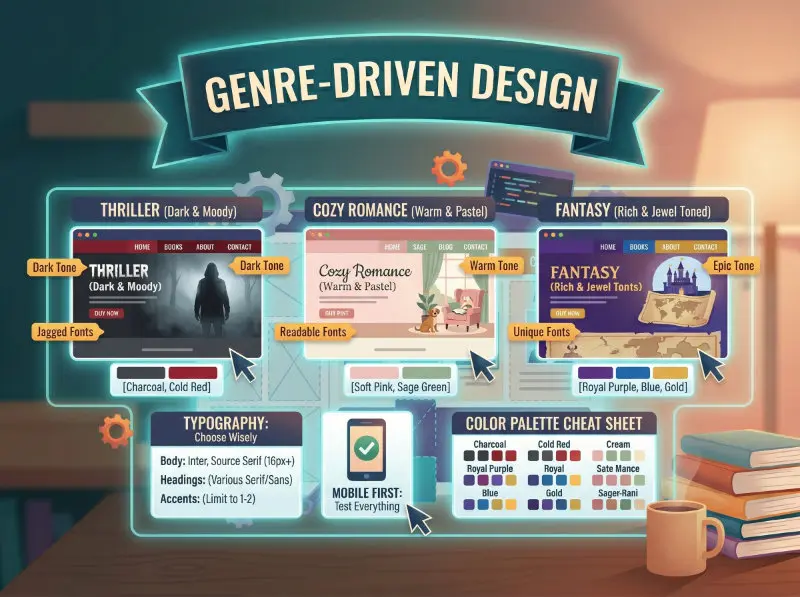
Here’s something I tell every author I work with: your website design should feel like your book covers.
If you write dark, moody thrillers — your website shouldn’t look like a pastel craft blog. If you write cozy romance — it shouldn’t look like a corporate law firm. Your readers make a genre judgment within seconds of landing on your page, and your design either confirms they’re in the right place or sends them running.
Genre-Driven Design
The colors, fonts, and imagery on your site should match the emotional tone of your books. I put together an entire Color Palette Cheat Sheet for Every Genre — it’s a visual guide that maps specific color combinations to genres like romance, thriller, fantasy, sci-fi, and nonfiction.
A few universal design rules that apply no matter what you write:
- White space is your friend. Don’t cram every inch of the screen with content. Let things breathe.
- Limit your fonts to 2-3. One for headings, one for body text, maybe one for accents. That’s it.
- Use high-quality images. Blurry book covers or pixelated author photos kill credibility instantly.
- Mobile first. Test your site on your phone. If it doesn’t look good there, most of your visitors are having a bad experience.
Typography Matters More Than You Think
Authors sell words. The way those words appear on your website — the font, the size, the spacing — matters more for an author site than almost any other type of website. Choose a clean, readable body font (like Inter, Source Serif, or Lora) and set it to at least 16px. Your readers’ eyes will thank you.
📧 Building Your Email List From Day One
This is the section I wish every author would read twice.
Your email list is the most valuable asset you own as an indie author. Not your social media following. Not your Amazon reviews. Your email list. Here’s why — email marketing consistently delivers the highest ROI of any marketing channel, and unlike social media, you OWN your subscriber list. No algorithm can throttle it.
I wrote the full strategy in Email Marketing for Authors: A Complete Guide, but here are the essentials for your new website:
The Signup That Actually Works
Most author websites bury their email signup in the footer. Don’t do that. Your email signup should be:
- On the homepage — front and center, above the fold
- On every blog post — at the top or within the content
- On a dedicated landing page — for social media links and ads
Give Them a Reason to Subscribe
Nobody signs up for a “newsletter” anymore. You need a reader magnet, something valuable enough that a reader will happily hand over their email address:
- 📖 A bonus chapter or deleted scene
- 📋 A reading order guide for your series
- 🎨 Exclusive character art or maps
- 📕 A free short story set in your book’s world
- ✅ A downloadable checklist related to your nonfiction topic
The key is making it directly related to your books. A “free website checklist” works for my audience — but for YOUR audience, think about what your readers would genuinely want.
Which Email Platform?
For authors just starting out, Mail Mint is a solid pick — it lives right inside your WordPress dashboard, so there’s no juggling a separate platform. The free tier gives you subscriber management and basic automation, which is everything you need to get started. Set up a welcome sequence (3-5 emails that introduce yourself and your books), and you’re ahead of most authors already.
🔍 SEO Basics: Getting Found by Readers
SEO — that’s basically how Google decides whether to show your site to people or bury it on page 47. The good news? For author websites, you don’t need to be an SEO expert. You just need to get a few basics right.
Here are the five things that actually matter:
1. Write Descriptive Page Titles
Every page on your site has a “meta title” — that’s the title Google shows in search results. Make it clear and descriptive:
- ✅ “Romance Novels by Sarah Mitchell | Small Town & Contemporary”
- ❌ “Home”
2. Add Alt Text to Every Image
Alt text describes your images to Google (and to visually impaired readers using screen readers). Every book cover, every author photo, give it a description.
- ✅ “Cover of ‘The Last Summer’ by Sarah Mitchell — a woman standing on a dock at sunset”
- ❌ “IMG_4392.jpg”
3. Blog Regularly (Even If It’s Monthly)
Fresh content tells Google your site is alive. You don’t need to blog weekly — but publishing a new post at least once or twice a month keeps your site relevant. Write about your writing process, your genre, your inspiration. Readers eat this stuff up AND it helps you rank.
4. Make Your Site Fast
Google rewards fast sites. Compress your images, use a caching plugin, and choose a quality host. Run your site through Google PageSpeed Insights and aim for a score above 80 on mobile.
5. Link Your Pages Together
Internal links — links from one page on your site to another — help Google understand your site structure AND help readers discover more of your content. Your homepage should link to your book pages. Your blog posts should link to related posts. Nothing should be a dead end.
For more on the free tools that make this easier, check out 7 Free WordPress Tools Every Author Needs.
⚠️ 5 Common Author Website Mistakes (And How to Avoid Them)
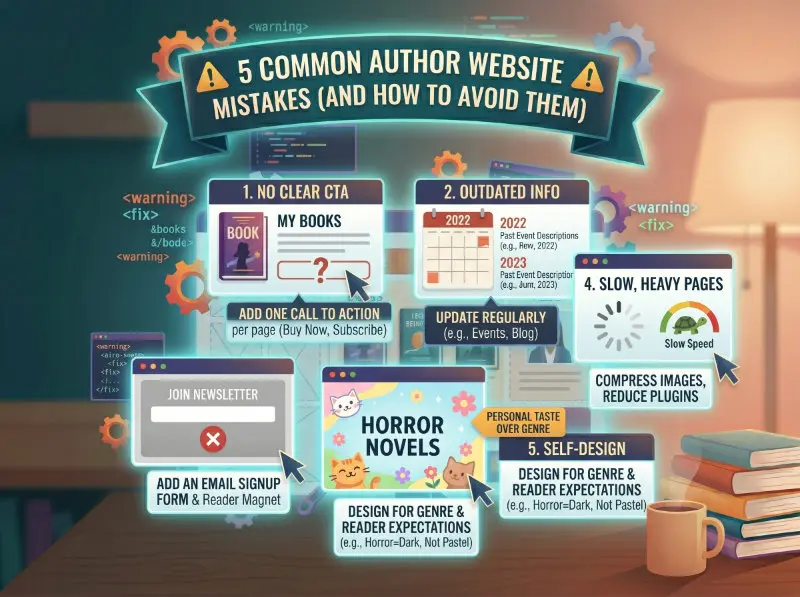
I’ve reviewed hundreds of author websites. These are the mistakes I see over and over — and they’re all fixable.
Mistake #1: No Clear Call to Action
A reader lands on your site. They like what they see. And then… nothing. No “buy my book” button. No email signup. No clear next step. Every page on your site should have ONE clear thing you want the visitor to do next.
Mistake #2: Outdated Information
Your latest book came out six months ago but your homepage still features your debut from 2019. Your events page lists signings from last year. Readers notice. Keep your site current — at minimum, update it every time you have a new release.
Mistake #3: No Email Capture
I already covered this, but it deserves repeating. If you don’t have an email signup on your site, you’re building on sand. Every visitor who leaves without subscribing is a reader you might never reach again.
Mistake #4: Slow, Heavy Pages
Giant uncompressed images. Auto-playing videos. Fifteen plugins you installed once and forgot about. All of this makes your site slow — and slow sites lose visitors. Google’s own research shows that 53% of mobile users leave a site that takes longer than 3 seconds to load.
Mistake #5: Designing for Yourself Instead of Your Readers
Your favorite color is teal. Great. But if you write horror novels, a teal and white website sends the wrong signal. Design for your READERS’ expectations, not your personal taste. Your site should feel like the inside of your books.
🚀 What’s Next: Taking Your Site Live
You’ve got your platform, your pages, your email signup, and a design that matches your brand. Here’s the launch checklist:
- ✅ All 7 essential pages are live and linked in your navigation
- ✅ Email signup is working and connected to your email platform
- ✅ Every book has a page with cover, description, and buy links
- ✅ Your site looks good on mobile (test it on your actual phone)
- ✅ Google can find you (submit your sitemap via Google Search Console)
If you want a head start, we’ve got professionally designed author website templates ready to go — built specifically for indie authors on WordPress. Pick your genre, customize the content, and you’re live in a fraction of the time.
And if the whole DIY thing isn’t for you — that’s okay too. Some authors would rather spend their time writing the next book than wrestling with WordPress. That’s exactly why we offer done-for-you author website design. We build it, you own it.
✅ Here’s What We Covered
- Your author website is the only piece of the internet you truly own — build one
- WordPress.org gives you the most control and flexibility for serious authors
- Every author site needs 7 essential pages — homepage, books, about, email signup, blog, contact, and media kit
- Your design should match your genre — readers judge in seconds
- Start building your email list from day one — it’s your most valuable asset
- Get SEO basics right (page titles, alt text, speed, blogging, internal links)
- Avoid the 5 most common mistakes that make author websites look amateur
❓ Frequently Asked Questions
How much does an author website cost?
It depends on the path you take. A self-built WordPress site costs roughly $50-150/year (domain + hosting). A professionally designed author website from a service like ours typically ranges from $500-2,000+ depending on complexity. The ongoing cost is primarily hosting — somewhere between $5-30/month depending on your provider and what’s included.
Can I build an author website for free?
Technically, yes — platforms like WordPress.com and Carrd offer free tiers. But “free” comes with trade-offs: you’ll have their branding on your site, limited design options, and no custom domain. For a professional author presence, budget at least $50-100/year for a domain and basic hosting. It’s one of the lowest-cost investments you’ll make in your author career.
How long does it take to build an author website?
If you’re using a template and have your content ready (bio, book descriptions, author photo), you can have a functional site up in a weekend. A more polished, customized site typically takes 1-2 weeks of part-time effort. If you’re working with a designer, expect 2-4 weeks from kickoff to launch depending on the scope.